Cold Turkey Alternative: Why Obserra Wins for YouTube
Cold Turkey vs Obserra: compare platforms, YouTube limits, enforcement and price, and see why Obserra is the better fit for a YouTube habit in 2026.
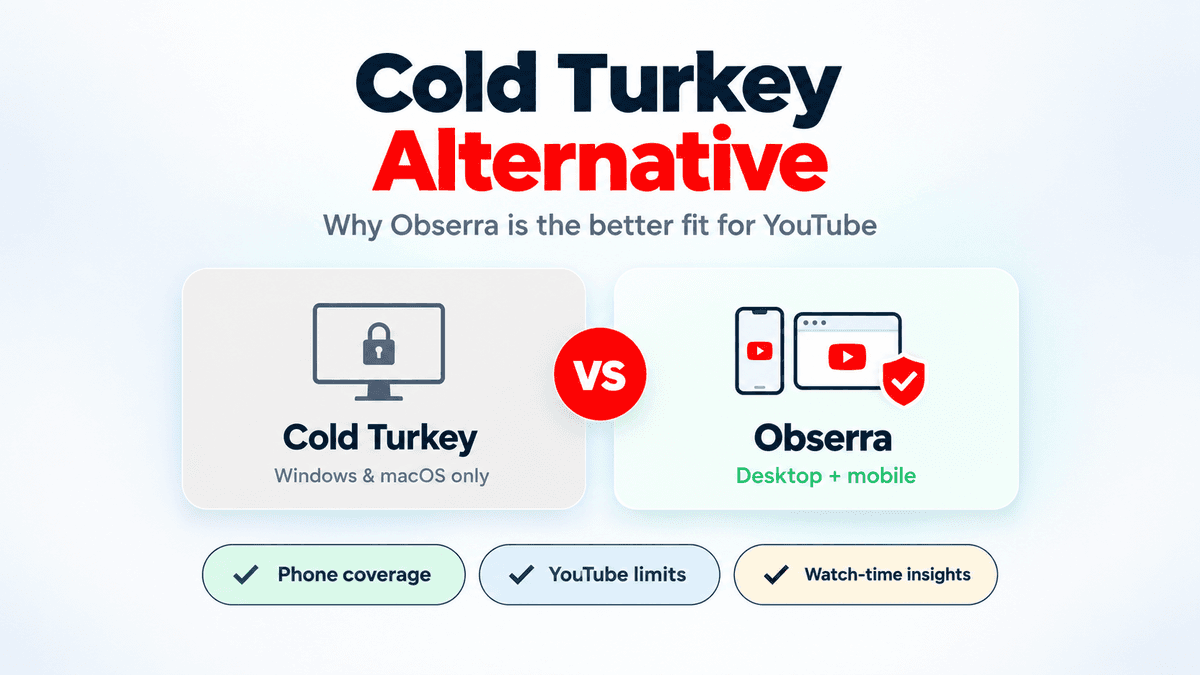
If you're looking for a Cold Turkey alternative, there's a good chance you're not trying to lock down an entire computer. You're trying to stop losing hours to YouTube, and Cold Turkey feels like more tool than you need.
The short answer: for YouTube, Obserra is the better fit. It's a free extension for Chrome, Edge, Brave and Firefox with iOS and Android apps, and it gives you daily limits, scheduled blocks, Shorts controls and insights instead of a general-purpose desktop lockdown. Cold Turkey is still excellent at one narrow job: making every website and app on a Windows or Mac computer genuinely hard to use. That's a different problem from the one most people are trying to solve.
Here's the honest comparison, including the one case where Cold Turkey is still the right choice.
What this covers
- What Cold Turkey does well
- Where Cold Turkey falls short for YouTube
- Why Obserra is the better alternative
- Obserra vs Cold Turkey
- How to switch from Cold Turkey to Obserra
- The one case where Cold Turkey wins
- Frequently asked questions
What Cold Turkey does well
Cold Turkey Blocker has been around since 2012 and it's still the benchmark for strict desktop blocking. The free version blocks websites, allows exceptions, handles timed blocks, and keeps statistics. Pro, a one-time purchase of around $39 at the time of writing, adds application blocking, recurring schedules, allowances and the locking features that made its reputation.
The locking is the point. A locked block can prevent you from disabling the browser extension or uninstalling the app, and Frozen Turkey can lock, log you off or shut down the computer for a set period. It can block entire sites, specific URLs, YouTube channels, apps, and the whole internet with an exception list. If your problem is "I will cheat my own blocker", Cold Turkey takes that seriously.
Where it stops fitting
Cold Turkey is a desktop commitment device. That's exactly what some people need, and exactly the wrong shape for others.
- No phone or Chromebook support. It runs on Windows and macOS only. If most of your YouTube watching happens on an iPhone, Android phone or Chromebook, Cold Turkey can't reach it.
- It blocks everything, not just YouTube. That's a feature until it isn't. You can maintain exception lists, but you're building a general-purpose blocklist rather than shaping one habit.
- It needs admin rights and a desktop install. That rules it out on a work laptop or a school device you don't control.
- It isn't built around YouTube's specific traps. It can block a channel or the site, but it doesn't give you a Shorts-specific limit, a daily watch-time allowance, or insights into where your YouTube time goes.
- The free tier is limited. Schedules and app blocking sit behind Pro.
Why Obserra is the better alternative
Obserra is a free browser extension for Chrome, Edge, Brave and Firefox, with iOS and Android apps. It's built for the problem Cold Turkey treats as a side feature: YouTube itself.
It works where you actually watch. Cold Turkey covers Windows and macOS. Obserra covers the browser on your computer and the YouTube app on your phone, with the same account and limits. For most people, the phone is where the habit continues after the laptop closes, and it's the gap a desktop-only blocker can't close.
It limits YouTube instead of banning the internet. You can set a daily watch-time limit, a daily video limit, or a Time Block for work and study hours. You can cap Shorts specifically, leave normal videos available, and hide the homepage feed, sidebar and end screens. Cold Turkey can block youtube.com or a channel, but it doesn't give you a watch-time allowance or a Shorts-specific limit.
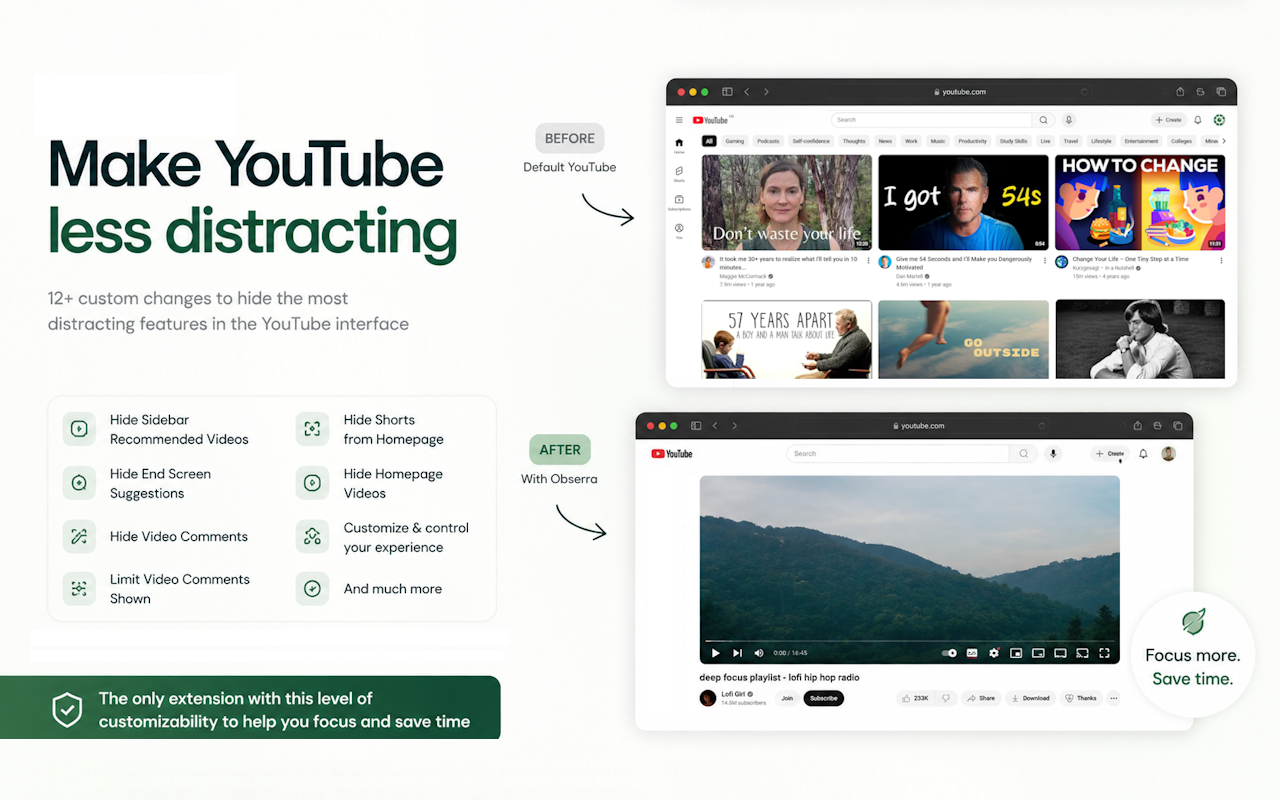
It shows you what's changing. Obserra's insights show your watch time, sessions, peak viewing hours and Shorts usage. You can see whether the limit is working instead of guessing. Cold Turkey keeps statistics, but they're built around blocked-site visits rather than your YouTube habit.
It's easier to live with. There's no admin install and no locked block to fight. You install an extension, set a limit, and adjust it when your schedule changes. That flexibility is why people keep using it; a block you abandon after three days isn't protecting anything.
It's free to start. The core YouTube limits are available without paying. Pro adds channel and genre limits, the dedicated Shorts limit, time blocks and full insights. Cold Turkey's free tier is limited to website blocking and timed blocks; schedules and app blocking require the one-time Pro purchase.
Where Obserra is weaker is deliberate: it doesn't block other websites or desktop apps, and it doesn't try to be unbypassable. If you need to lock down an entire computer, keep reading, because that's the one job Cold Turkey does better.
Obserra vs Cold Turkey
- Platforms: Obserra covers Chrome, Edge, Brave, Firefox, iOS and Android. Cold Turkey covers Windows and macOS only. For YouTube across devices, Obserra wins.
- What it blocks: Obserra limits YouTube in the browser and on mobile. Cold Turkey blocks websites and apps system-wide, with app blocking on Pro. For a YouTube habit, Obserra's focus is the advantage.
- YouTube controls: Obserra has daily watch-time limits, video limits, a Shorts limit, channel and genre limits, recommendation hiding and insights. Cold Turkey has site, URL and channel blocking plus statistics. Obserra wins.
- Cross-device coverage: Obserra works on your phone and computer. Cold Turkey has no mobile app. Obserra wins.
- Enforcement: Cold Turkey's locked blocks resist disabling and uninstalling. Obserra is an extension and can be disabled. Cold Turkey wins on raw enforcement, but that's not what most YouTube habits need.
- Scheduling: Both support scheduled blocks. On Cold Turkey, scheduling is a Pro feature. Obserra is the simpler path.
- Setup: Obserra installs per browser with no admin rights. Cold Turkey needs administrator access and a desktop install. Obserra wins.
- Price: Obserra is free with a Pro tier. Cold Turkey is free with a one-time Pro purchase of around $39. Obserra costs nothing to try, and the free plan covers the core YouTube limits.
- Best for: Obserra is for fixing a YouTube habit across devices. Cold Turkey is for locking down a Windows or Mac desktop. If YouTube is your problem, Obserra is the better choice.
For a broader comparison with other YouTube blockers, see our comparison page.
How to switch from Cold Turkey to Obserra
You don't have to uninstall Cold Turkey to try Obserra. Run both for a week and see which one you actually keep using.
- Create an account and install the extension. Register at obserra.com, then follow the download instructions for your browser.
- Recreate the block you already rely on. If Cold Turkey blocks YouTube from 9 to 5, set a Time Block for those hours. If it gives you 30 minutes a day, set a Daily Limit. Start close to what you know works rather than inventing a new routine.
- Add the mobile app if your phone is part of the problem. This is the gap Cold Turkey can't cover, and it's usually where the habit continues after you close your laptop.
- Keep Cold Turkey for everything Obserra doesn't cover. If YouTube was the only entry in your Cold Turkey blocklist, you can remove it after a week or two. If you also block games or other sites, keep both.
If you're switching because Cold Turkey felt too strict, start looser than you think you need. A block you keep is better than a perfect one you disable.
The one case where Cold Turkey wins
If your goal is to make a Windows or Mac computer hard to waste time on, across every website and app, Cold Turkey is the stronger tool. Its locked blocks and Frozen Turkey mode are built for exactly that, and Obserra doesn't try to compete with them.
But that's a different job from fixing a YouTube habit. If YouTube is the site that eats your evening, you don't need to block your entire computer, and the extra strictness usually makes people disable the block rather than change the habit. For that problem, Obserra is the better fit.
Frequently asked questions
Is Obserra a good Cold Turkey alternative?
Yes, if your goal is YouTube. Obserra gives you daily watch-time limits, video limits, Shorts controls, schedules and insights across desktop and mobile. It isn't a system-wide blocker, so it isn't a replacement for Cold Turkey if you need to block every site and app on a computer.
Does Cold Turkey work on iPhone or Android?
No. Cold Turkey Blocker supports Windows and macOS only. Its own documentation says Android, iOS, Linux and ChromeOS aren't supported. If your phone is where you lose time, Cold Turkey can't help, which is the main reason people look for an alternative.
Can Obserra block every website?
No. Obserra is built around YouTube. It can block YouTube in the browser, enforce daily limits, hide recommendations and Shorts, and apply limits on mobile. For blocking all sites and apps on a desktop, Cold Turkey is the better tool.
Is Obserra as hard to bypass as Cold Turkey?
No, and it doesn't pretend to be. Obserra is an extension, so it can be disabled. It's designed for sustainable limits and awareness rather than a lockout. That's a deliberate trade-off: most people abandon a locked block, while a limit they can adjust is one they keep using.
Do I need admin rights for Obserra?
No. The extension installs per browser, and the mobile apps install normally. Cold Turkey needs administrator rights because it blocks at the system level, which also makes it harder to use on a work or school device.
Can I use Obserra and Cold Turkey together?
Yes, and it's a sensible combination for some people: Cold Turkey for system-wide blocks on the computer, Obserra for YouTube-specific limits, phone coverage and insights. They solve different parts of the same problem.
Is Cold Turkey a one-time purchase?
Yes. Cold Turkey Blocker has a free version, and Pro is a one-time purchase of around $39 at the time of writing, valid for the Windows and macOS computers you personally use.
Which is better for YouTube, Obserra or Cold Turkey?
Obserra. Cold Turkey can block youtube.com, but it doesn't give you watch-time limits, a Shorts-specific limit, recommendation hiding or mobile coverage. Those are the controls that matter for a YouTube habit.
For YouTube, Obserra is the better alternative
Cold Turkey is a strong tool for one specific job: making a Windows or Mac computer hard to waste time on. But if YouTube is the site that eats your evening, especially on your phone, it's the wrong shape. Obserra gives you daily limits, schedules, Shorts controls and insights across desktop and mobile, without blocking the rest of the web or requiring admin access.
Create a free Obserra account, install the extension, and set your first limit. If you're not sure, run it alongside Cold Turkey for a week and compare your watch time. Most people find the YouTube-specific limits are the ones they actually keep.
Keep Reading
How to Block YouTube on a Chromebook (Personal & School)
Block YouTube on a Chromebook with an extension, Family Link, DNS or your router. Step-by-step guide, plus what works on a school-managed Chromebook.
Read article
How to Block YouTube on Windows 11 (and Windows 10)
Block YouTube on Windows 11 or 10 with an extension, Microsoft Family Safety, the hosts file or DNS. Step-by-step instructions and which method actually works.
Read article
How to Block YouTube on a Mac (Safari, Chrome and System-Wide)
Block YouTube on your Mac in Safari, Chrome or every browser. Compare Screen Time, the hosts file and a browser extension, with step-by-step instructions.
Read article


