How to Limit and Block YouTube Shorts: Daily Limits, Activity, and Insights
Learn how to limit or block YouTube Shorts with Obserra. Set a daily Shorts time limit, hide Shorts from your homepage, disable Shorts, and understand your viewing habits with Insights.
Content
- Introduction
- See Your Shorts Activity
- Understand Your Shorts Habits With Insights
- Set a Daily Shorts Limit
- Build More Intentional YouTube Habits
- Conclusion
Introduction
YouTube Shorts are easy to watch and difficult to stop watching. One quick video can turn into an endless scroll, especially when you are using YouTube during a break or avoiding a task.
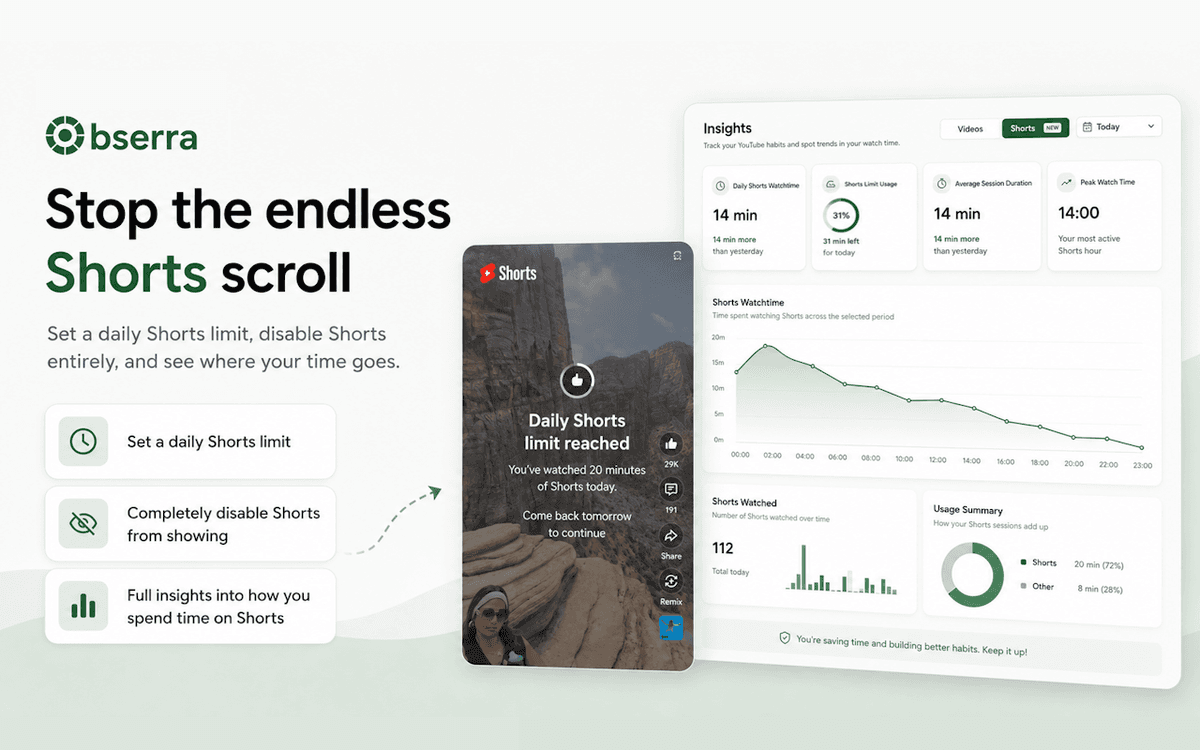
That is why we are excited to introduce a new way to manage Shorts with Obserra. Shorts now appear in your Activity, you can explore a dedicated Shorts section on the Insights page, and you can set a daily limit for how long you want to watch them.
This update gives you more than a reminder to spend less time on YouTube. It helps you understand your viewing habits, spot patterns, and make a plan that works for your day.
Obserra already includes tools for removing Shorts from your YouTube experience. You can hide recommended Shorts from the YouTube homepage, or use Disable YouTube Shorts to prevent Shorts from playing anywhere on YouTube. These options are useful when you want to remove the distraction completely. The new Activity, Insights, and limit features are designed for when you still want to watch Shorts, but want clearer boundaries around your time.
See Your Shorts Activity
Shorts activity is recorded separately from regular YouTube videos, so you can see how much of your time is going into short-form content. Open the Activity page and select YouTube Shorts from the filter to view your Shorts sessions.
Each session includes details such as:
- the number of Shorts watched
- how long the session lasted
- when the session started and ended
- your Shorts watch-time usage
Shorts sessions can feel much shorter than they really are. Looking back at your activity makes those patterns easier to notice, whether you are regularly opening Shorts late at night or losing time to several small sessions throughout the day.
Understand Your Shorts Habits With Insights
Activity shows you individual sessions, while the Shorts section on the Insights page helps you see the bigger picture. Choose a time range to look at your Shorts habits for today, the last 7 days, the last 30 days, or longer periods.
At the top of the page, you will find four useful statistics:
- Daily Shorts Watchtime - See the average amount of time you spend watching Shorts each day during the selected period. This helps you understand your usual daily habit instead of focusing on one unusually long session.
- Shorts Limit Usage - If you have set a daily Shorts limit, this shows how much of that allowance you are using on average. It gives you an easy way to see whether your limit is realistic or needs adjusting.
- Average Session Duration - Find out how long your typical Shorts session lasts. Comparing this with your daily watch time can show whether your time is coming from one long scroll or several shorter sessions.
- Peak Watch Time - See the hour when you are most active on Shorts. Once you know when you are most likely to get distracted, you can plan a break, enable a time block, or keep your phone away during that part of the day.
Track watch time and the number of Shorts
The Shorts Watchtime graph shows how much time you spent watching Shorts across the selected period. You can use it to find days when your watch time increased and compare those days with your schedule.
There is also a Shorts Watched graph, which shows how many Shorts you watched over time. Watch time and the number of Shorts tell you different things. A high number of Shorts may point to frequent scrolling, while a smaller number with high watch time may mean that your sessions are lasting longer than intended.
Review your Shorts usage summary
The Usage Summary brings your main Shorts numbers together. It includes:
- Active days - The number of days you watched Shorts compared with the number of days in the selected period.
- Total sessions - How many separate Shorts sessions you started.
- Average Shorts per day - The typical number of Shorts watched each day.
- Average time per active day - How much time you spend watching Shorts on the days you actually use them.
- Longest session - The longest Shorts session recorded during the selected period.
For shorter time ranges, Obserra can also compare your results with the previous period. You can see whether you watched more or fewer Shorts, whether your average session changed, and whether your Shorts limit usage went up or down.
Set a Daily Shorts Limit
Insights help you understand your habits, but sometimes you need a clear boundary to stop a scrolling session. The new Daily Shorts Limit lets you choose the maximum amount of time you can watch Shorts each day.
To set it up:
- Open the Settings page in Obserra.
- Find Daily Shorts Limit under your YouTube limits.
- Enable the limit.
- Choose the amount of Shorts watch time you want to allow each day.
Once you reach your daily allowance, Obserra blocks further Shorts viewing until the next day. You can choose a limit that fits your routine, whether you want to leave room for a short break or significantly reduce your Shorts watch time.
Build More Intentional YouTube Habits
The goal is not to make YouTube impossible to use. It is to help you use it deliberately. Start by checking your Shorts Insights and looking for the habit that is costing you the most time. Maybe your sessions are longest in the evening, or maybe several short visits add up to more than you expected.
Once you know what is happening, set a Daily Shorts Limit that supports your priorities. You can also combine it with Obserra's other YouTube productivity features, including daily video limits, breaks, time blocks, and client modifications.
Conclusion
Shorts can be entertaining, but the endless feed makes it easy to lose track of time. With Shorts now included in Activity, detailed Shorts Insights, and a Daily Shorts Limit, Obserra gives you the tools to understand your viewing and take control of it.
Visit your Activity to review your Shorts sessions, open Insights to find your patterns, and go to Settings to create your daily limit.
If you want to go further than a single limit, read our guide to a daily routine to limit YouTube Shorts and improve focus. It walks through your whole day, hour by hour, and shows you how to make each step automatic.
Keep Reading
How to Block YouTube at Certain Times for Work or Study
Learn how to block YouTube at certain times for work or study. Set up daily schedules, leave room for breaks, and check which options work on your device.
Read article
A Simple Daily Routine to Limit YouTube Shorts and Improve Focus
A simple daily routine to limit YouTube Shorts and improve focus. Exact times, limits, and tools to make every step automatic and stop losing hours.
Read article
How to Block YouTube on Your Computer: 5 Ways That Actually Work
Learn how to block YouTube on your computer with 5 proven methods - browser extension, device settings, hosts file, or router - and take back your focus.
Read article


