How to Stop Watching YouTube Shorts (and Make It Stick)
A practical plan to stop watching YouTube Shorts for good: remove the triggers, handle the urge, replace the habit, and recover after a slip without quitting.
You didn't plan to watch Shorts for forty minutes. You opened YouTube to check one thing, the Shorts shelf was sitting there, and the next thing you knew the video you came for was still waiting in another tab. That's not a character flaw. It's the design.
The bottom line: the reliable way to stop watching Shorts is to remove access, not to resist the urge. Disable Shorts where you can, take the app off your home screen, remove the cues that lead you there, and plan what you'll do when the urge hits. Willpower is the backup, not the strategy.
This guide is a practical plan for how to stop watching YouTube Shorts for good: what makes them sticky, a step-by-step plan, how to get through the first few days, and what to do when you slip.
In this guide
- Why Shorts are so hard to stop
- Step 1: Make Shorts unavailable
- Step 2: Remove the entry points
- Step 3: Add friction where you usually scroll
- Step 4: Replace the urge, not just the app
- Step 5: Get through the first few days
- Step 6: Handle a slip without quitting
- Step 7: Track what actually changes
- Frequently asked questions
Why Shorts are so hard to stop
A long video has an ending. You reach the credits, the player stops, and you make a decision about what to do next. Shorts remove that moment. There's always another clip already loading, so the default answer to "should I keep watching?" is yes, because the question never gets asked.
That's compounded by three things. The feed is personalized, so the next clip is usually something you'll like. The reward is unpredictable, which is more compelling than a predictable one. And the format is short enough that "just one more" feels cheap, even when it has already cost you half an hour.
Research on short-form video points in the same direction: the format is designed to keep you in a continuous loop, and stopping takes more deliberate effort than scrolling. We covered what the research does and doesn't prove in our article on the brain research behind Shorts.
None of that means you're weak. It means the deck is stacked, and the fix is to change the environment rather than lose the same fight every evening.
Step 1: Make Shorts unavailable
This is the step most people skip, and it's the one that does the heavy lifting. If Shorts are still one tap away, you're relying on a decision made at your weakest moment. Remove the option instead.
On a computer: if you use Obserra, open Settings and enable Disable YouTube Shorts under Client Modifications. That removes Shorts from the homepage and stops them playing anywhere on YouTube. If you only want them off the homepage, use Hide YouTube Shorts instead. The difference is covered in our guide to limiting and blocking Shorts.
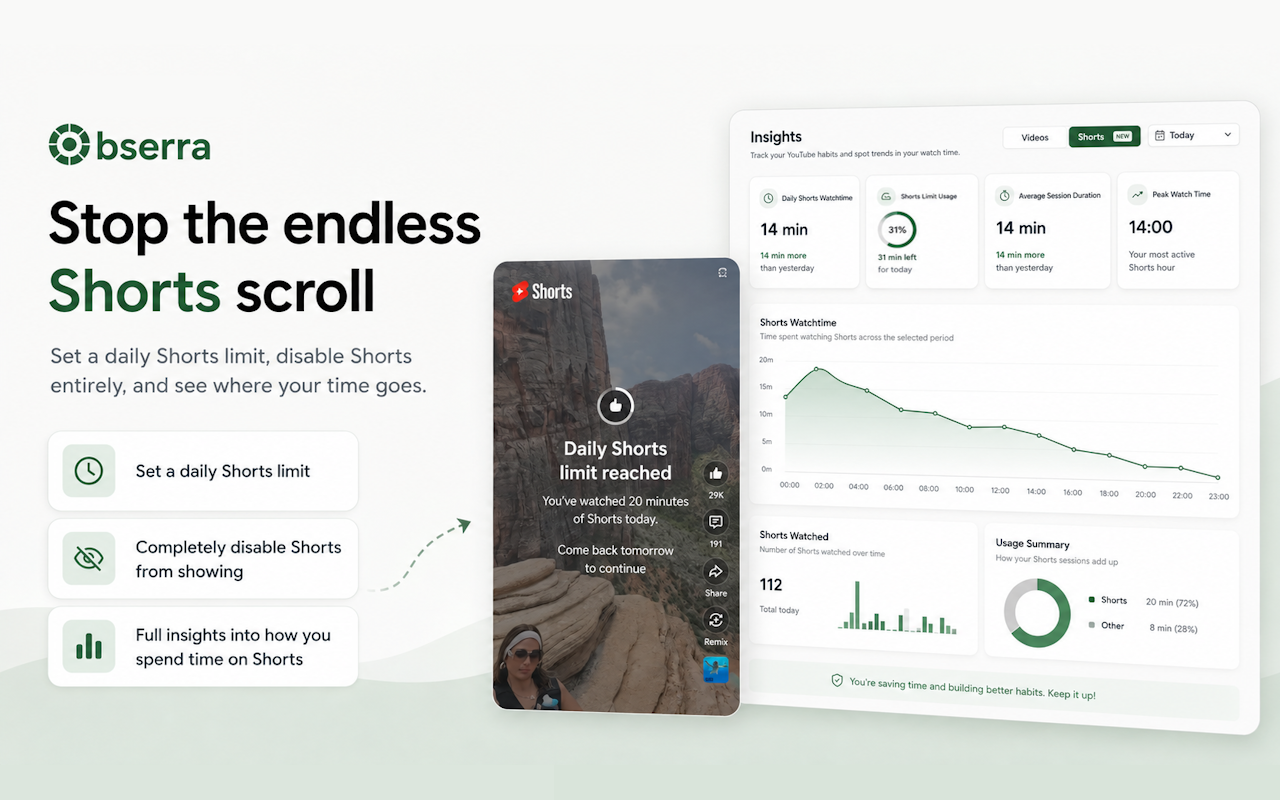
On your phone: this is where the habit usually lives. Start by removing the YouTube app from your home screen and app dock. If you can, delete the app entirely and use YouTube in a browser instead; it's a worse experience for Shorts, which is the point. Obserra's mobile app can also apply a Shorts limit if you need a daily cap rather than a full block.
As a backstop: use your phone's built-in screen-time controls to set an app limit for YouTube. It won't remove Shorts specifically, but it puts a ceiling on the session. A limit you can dismiss in two seconds is weak; a limit that requires a passcode you don't have is stronger.
If you're deciding between a limit and a block, choose the block. A daily allowance still leaves the door open, and "I'll just use my ten minutes now" is exactly the negotiation you're trying to avoid.
Step 2: Remove the entry points
You don't decide to watch Shorts. Something puts them in front of you. Find those entry points and close them one by one.
- The home screen icon. Remove it from your home screen and dock. If you have to search for the app, you get a few seconds to remember you don't want to open it.
- Notifications. Turn off YouTube notifications, especially the "new video" and "recommended" ones. Each notification is an invitation to open the app.
- The Shorts shelf. On the homepage, use Hide YouTube Shorts if you're not ready to disable them entirely.
- Autoplay. Turn it off in the YouTube player. It won't stop you tapping a Short, but it stops the next one from starting without a decision.
- Bookmarks and widgets. Remove YouTube from your browser's bookmarks bar and from any home-screen widget. The fewer places it appears, the less often you'll think about it.
- The bedtime cue. If you scroll in bed, charge your phone across the room. If you scroll in the bathroom, leave the phone outside. Change the place, not just the intention.
Step 3: Add friction where you usually scroll
Friction is anything that makes the habit take longer than the urge lasts. You don't need an unbreakable system; you need a few seconds of resistance at the right moment.
- Log out of YouTube on your phone. Typing a password every time is enough to stop most impulse opens.
- Use a browser instead of the app. Mobile web YouTube is clunkier, and a browser with Shorts hidden is a different experience.
- Put the app behind a passcode. Some phones let you lock an app with a password or biometric. If someone else can set the passcode, even better.
- Make the phone boring. Grayscale mode and a plain wallpaper reduce the pull of the screen without requiring discipline.
- Keep the phone out of reach during trigger times. If you always scroll after dinner, leave the phone in another room for twenty minutes after you eat.
The goal is not to make YouTube impossible. It's to make the automatic version of the habit slightly harder than the deliberate version.
Step 4: Replace the urge, not just the app
If you remove Shorts and change nothing else, the urge will look for somewhere to go. It might find TikTok, Reels, or a browser tab. That's why replacement matters: you need a specific answer to "what do I do instead, right now?"
Don't choose something vague like "read more". Choose something small enough to start in the moment. A few examples that work because they're physical and immediate:
- Stand up and get a glass of water.
- Walk to the end of the street and back.
- Do ten push-ups or stretch for one minute.
- Read one page of a book that's already within reach.
- Text one person and ask how their day is going.
- Step outside for two minutes of daylight.
Write your answer down before you need it: "If I want to open Shorts, I will ___." Deciding in advance is far easier than deciding while the feed is loading. The urge usually peaks and passes within a few minutes; your job is to have something to do while it does.
Step 5: Get through the first few days
The first few days are the hardest, and they follow a fairly predictable pattern. Knowing what to expect makes it easier to ride out.
Day 1: expect restlessness
You'll reach for your phone before you remember you're not doing this anymore. That's not failure; it's the old cue firing. Remove access, expect the discomfort, and don't negotiate with it. If you can, keep the first day busy and keep your phone out of your hand.
Day 2: the usual times will hit
The habit is attached to moments: lunch, the commute, the sofa, bedtime. When those moments arrive, the urge will feel louder than it did on day one. Use the replacement you chose in Step 4. Don't wait for motivation; do the small physical thing.
Day 3: it starts to feel less urgent
The pull usually softens once your brain stops expecting the reward at the usual times. It won't disappear, but it becomes easier to notice without acting on it. Keep the barriers in place; this is not the moment to test yourself by reinstalling the app.
Two things make the first days harder than they need to be. The first is replacing Shorts with another infinite feed (TikTok, Reels, Instagram), which keeps the same loop running. The second is treating a bad night's sleep or a stressful day as a reason to abandon the plan. Expect both, and decide in advance that they don't change the plan.
Step 6: Handle a slip without quitting
Most people don't fail because they watch one Short. They fail because watching one Short turns into "I've ruined it, I might as well keep going". That's the moment to plan for, not the slip itself.
- Stop at the current clip. Not after the next one. Close the app or the tab as soon as you notice what's happening.
- Don't compensate by bingeing or by making the rules harsher. A slip is not a debt. Get back to the barrier the same day.
- Write down the trigger. Were you bored, tired, stressed, waiting, or avoiding a task? The trigger tells you which barrier to strengthen.
- Change one thing, not everything. Add a bit more friction where the slip happened, then carry on. A plan you adjust is more useful than a plan you abandon.
One slip is a data point. The pattern is what matters, and the pattern is built by what you do the day after.
Step 7: Track what actually changes
You can't tell whether this is working by how it feels, because the first week usually feels worse. Look at the numbers instead. Obserra's insights page shows your daily Shorts watch time, number of sessions and longest session.
Once a week, look at those three numbers and compare them with the week before. If all three are trending down over two or three weeks, the plan is working even if you don't feel different yet. If they aren't moving, change one barrier and try again. That's the whole review: three numbers, one adjustment, next week.
Frequently asked questions
Is YouTube Shorts addiction real?
"Addiction" isn't a formal diagnosis for short-form video, but compulsive use is a real pattern, and the design is deliberately hard to stop. If Shorts are costing you sleep, work or study, you don't need a label to justify changing the habit.
How long does it take to stop watching Shorts?
The strongest urges usually fade within the first week, and the habit becomes much easier once your usual cues stop leading to the feed. Replacing the habit and changing your environment matters more than waiting for the urge to disappear.
Should I quit YouTube completely?
Not necessarily. If long-form videos are useful to you, disable Shorts and keep the rest of YouTube. That's easier to sustain than banning the whole platform, and it targets the part that's actually costing you time.
Does deleting the YouTube app work?
It helps, but it isn't enough on its own. The mobile browser is a loophole, and so is another device. Delete the app, remove the browser bookmark, log out, and use a blocker if you need the barrier to hold.
Is a daily Shorts limit enough?
For some people, yes. If you can keep to a limit without negotiating, a daily cap is a reasonable middle ground. If you find yourself using the whole allowance at the worst time of day, a block is more reliable. Our daily routine for limiting Shorts covers the middle-ground approach.
What if I need YouTube for work or study?
Keep it. Disable Shorts and leave normal videos and search available. You can also hide the homepage feed and sidebar so YouTube becomes a search tool rather than a feed.
Will I lose my subscriptions or watch history?
No. Disabling Shorts or hiding recommendations doesn't delete your account, subscriptions or history. It changes what YouTube shows you, not what YouTube knows about you.
You don't need more willpower
You need fewer moments where willpower is the only thing standing between you and the feed. The plan for how to stop watching YouTube Shorts isn't more discipline; it's making Shorts unavailable, removing the cues that lead there, deciding what you'll do when the urge hits, and expecting the first few days to feel uncomfortable. That's a plan you can keep.
Create a free Obserra account, install the extension, and disable Shorts in Settings > Client Modifications. If you want a softer start, hide Shorts from the homepage first and work up to disabling them entirely.
Keep Reading
Cold Turkey Alternative: Why Obserra Wins for YouTube
Cold Turkey vs Obserra: compare platforms, YouTube limits, enforcement and price, and see why Obserra is the better fit for a YouTube habit in 2026.
Read article
How to Block YouTube on a Chromebook (Personal & School)
Block YouTube on a Chromebook with an extension, Family Link, DNS or your router. Step-by-step guide, plus what works on a school-managed Chromebook.
Read article
How to Block YouTube on Windows 11 (and Windows 10)
Block YouTube on Windows 11 or 10 with an extension, Microsoft Family Safety, the hosts file or DNS. Step-by-step instructions and which method actually works.
Read article


