How to Reduce YouTube Screen Time (Without Quitting YouTube)
A practical, measurement-first plan to reduce YouTube screen time: find where it goes, set a realistic target, change the defaults, and track what works.
"Screen time" is one of those numbers that's easy to ignore and hard to change. You check it, feel briefly bad, and then the next notification arrives. YouTube is usually a big part of it, and "watch less" is not a plan.
The short answer: reducing YouTube screen time works better as a measurement problem than a willpower problem. Get a baseline, choose a target you can actually hit, cut the automatic sessions first, replace the time with something deliberate, and review the numbers weekly. A 20 to 30 percent cut you keep beats a 100 percent cut you abandon in three days.
This guide walks through that process step by step, with the settings that matter on desktop and mobile.
The plan at a glance
- Why "watch less YouTube" fails
- Step 1: Measure your actual screen time
- Step 2: Choose a realistic target
- Step 3: Cut the biggest sources first
- Step 4: Change the defaults
- Step 5: Replace the time, not just block it
- Step 6: Track progress and adjust
- What to do when you slip
- Frequently asked questions
Why "watch less YouTube" fails
Most people try to reduce YouTube screen time by deciding to use it less. That fails for four predictable reasons.
- There's no baseline. You don't know what "less" means, so you can't tell whether you succeeded.
- There's no target. "Less" is a feeling, not a number. A feeling is easy to negotiate with at 11pm.
- It relies on the moment you're weakest. Every open is a fresh decision, made while the app is already in front of you.
- It removes the habit without replacing it. The time had a purpose, even if that purpose was avoiding something else.
The fix is to make the decision once, in advance, and then change the environment so the default is smaller. That's what the rest of this guide does.
Step 1: Measure your actual screen time
You can't improve a number you haven't measured. Pick one source of truth for the next seven days and change nothing else.
- For YouTube in a browser: use Obserra's insights. It shows daily watch time, average session length, peak viewing hours and your Shorts usage.
- For the YouTube app on your phone: use iOS Screen Time or Android Digital Wellbeing. It will show total time in the YouTube app, though it won't separate Shorts from long videos.
- For patterns: your YouTube watch history can show when and what you watched, even if it doesn't give you a clean total.
Write down four numbers at the end of the week: your daily average, the number of separate sessions, your longest session, and the time of day you watch most. Those four are enough to build a plan. Don't try to change anything during the baseline week; you're measuring the habit as it is, not the version you wish you had.
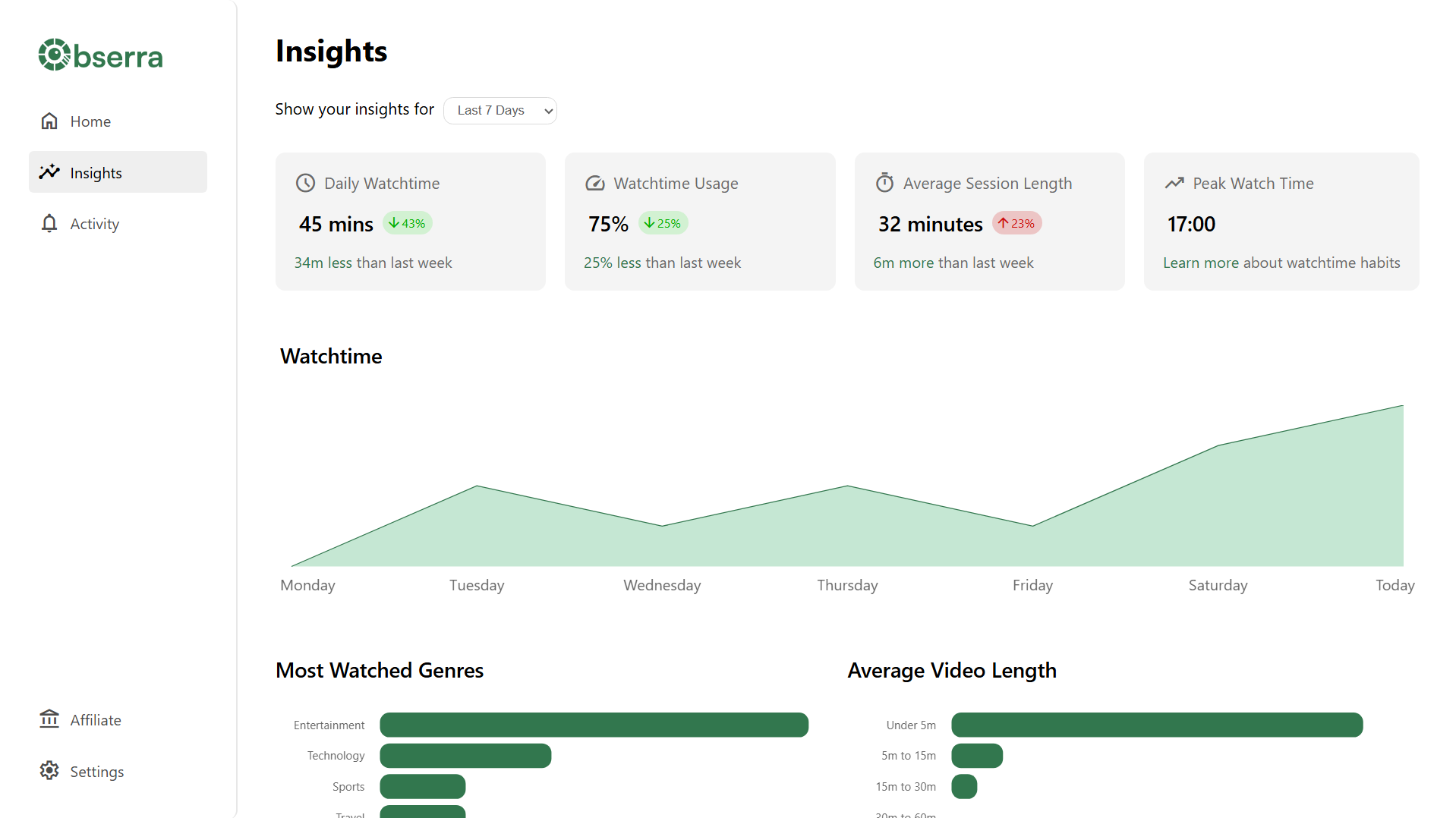
One clarification, because it trips people up: "watch time" in YouTube Studio is a creator metric. It tells you how long people watched your videos, not how long you watched YouTube. For your own viewing, use your device's screen-time tools or Obserra.
Step 2: Choose a realistic target
Going from two hours a day to zero usually produces three good days and then a rebound. Start with a cut you can hold: 20 to 30 percent below your baseline.
If your baseline is 120 minutes a day, that means 84 to 96 minutes. Round it to 90 and make it concrete: 90 minutes a day, with no YouTube before 9am. A specific number and a specific rule are much easier to keep than "use it less".
Then decide how you'll enforce it. A daily YouTube limit is the simplest option: you set the number once, and YouTube stops when you reach it. If your problem is a particular time of day rather than a total, use Time Blocks instead.
Change one thing at a time. If you cut your limit, disable Shorts and remove the app from your phone on the same day, you won't know which change helped. Give each change a week before adding the next.
Step 3: Cut the biggest sources first
Look at your baseline and find the largest block of time. For most people it's one of three things: Shorts, autoplay, or the homepage feed. Attack whichever is biggest before you touch anything else.
If Shorts dominate
Disable YouTube Shorts under Settings > Client Modifications, or hide them from the homepage if you're not ready to remove them entirely. A dedicated Shorts limit is the middle ground. Our guide to limiting and blocking Shorts covers the difference. If you want to quit them entirely rather than cap them, see how to stop watching YouTube Shorts.
If you lose time to autoplay
Turn autoplay off in the player. It's a small setting with an outsized effect, because it removes the "next video started before I decided" problem.
If the homepage feed pulls you in
Hide recommended videos, the sidebar and end screens. You can still search for what you came for and open your subscriptions, but the automatic chain of suggestions disappears. We cover the exact settings in how to block YouTube recommendations.
If your problem is total time rather than a specific surface, start with the Daily Limit and leave the rest alone for a week. The point is to change one variable, measure the result, and then decide what to change next.
Step 4: Change the defaults
Your screen time is shaped by what's easy to reach. Make the automatic version of YouTube harder and the deliberate version easier.
- Remove the app from your home screen. Keep it out of the dock. If you have to search for it, you get a few seconds to decide.
- Turn off YouTube notifications. Every "new video" alert is an invitation to open the app.
- Log out on your phone. Typing a password is enough friction to stop most impulse opens.
- Use the browser instead of the app. Mobile web YouTube is clunkier, which is exactly the point.
- Keep the phone out of the bedroom. If bedtime scrolling is your biggest session, charge the phone across the room.
- Try grayscale. A less colorful screen is less compelling, and it costs nothing to test for a week.
You don't need all of these. Pick the two that match where your baseline says the time is going.
Step 5: Replace the time, not just block it
If you remove YouTube and change nothing else, the urge will look for somewhere to go. Sometimes it finds another infinite feed, which keeps the same loop running with a different logo.
Decide in advance what you'll do instead, and make it small enough to start immediately. "Read more" is too vague. "Read one page of the book on the sofa" is a real instruction. Other examples that work because they're physical: make a drink, walk to the end of the street, stretch for a minute, text a friend, step outside for two minutes of daylight.
Write it down as an if-then rule: "If I reach for YouTube after dinner, I will read one page first." The rule does the deciding for you at the moment the habit usually wins.
Step 6: Track progress and adjust
Once a week, compare the same four numbers from your baseline: daily average, sessions, longest session and peak time. Don't judge a single day. Look at the trend across two or three weeks.
If the numbers are moving in the right direction, change nothing. If they aren't, check the obvious causes before adding more restrictions:
- Is the limit set where you think it is?
- Are you watching in another browser, another profile, or on another device?
- Is the limit so high that it never triggers?
- Did you remove the trigger, or only add a limit after it?
Then change one setting and give it another week. This is the whole review: four numbers, one adjustment, next week.
What to do when you slip
A bad day is data, not a verdict. The dangerous moment isn't the slip itself; it's the story you tell yourself afterward. "I've ruined it, so I might as well keep going" turns one long session into a lost week.
When it happens, stop at the current video, note what triggered it, and get back to the plan the same day. Don't compensate by bingeing, and don't make the rules harsher to punish yourself. Change one barrier where the slip happened and carry on. The pattern is built by what you do the day after, not by being perfect.
Frequently asked questions
How do I check my YouTube screen time?
Use iOS Screen Time or Android Digital Wellbeing for time in the YouTube app, and Obserra's insights for watch time in your browser, including Shorts. YouTube's own "watch time" in Studio is a creator metric, not a viewer screen-time report.
Does YouTube have a built-in screen time limit?
It has break reminders and a bedtime reminder, but not a hard daily cap for viewers. You can dismiss a reminder and keep watching. A tool like Obserra adds an actual limit that blocks playback when you reach it.
How much YouTube screen time is too much?
There's no official healthy number, and anyone who gives you one is guessing. The useful test is whether the time matches what you intended and whether it's interfering with sleep, work, study or people you care about. Start from your own baseline rather than a universal target.
What's the fastest way to reduce YouTube screen time?
Remove the automatic sessions first: disable or limit Shorts, turn off autoplay, and hide the homepage feed. Those changes cut time without requiring a decision every time you open YouTube. Then add a daily limit for the remaining viewing.
Is 30 minutes or an hour a day realistic?
It depends on your baseline and what YouTube is for. If you currently watch two hours, a jump to 30 minutes usually fails. Start with a 20 to 30 percent cut, hold it for two weeks, then decide whether to reduce further.
Will this stop me using YouTube for work or study?
No. You can keep search, subscriptions and specific videos available while limiting the feed and Shorts. If you need YouTube for particular hours, use Time Blocks to protect the rest of the day instead of banning it entirely.
How long does it take to feel normal?
The first week is usually the hardest, and the urge softens over the following two or three weeks. You'll know the change is sticking when you stop thinking about the limit and start noticing the time you got back.
Reduce the default, not your willpower
You don't need a dramatic digital detox. You need a baseline, a target you can keep, fewer automatic sessions, and something better to do when the urge arrives. Measure for a week, cut by 20 to 30 percent, change one default at a time, and review the numbers every Sunday.
Create a free Obserra account, install the extension, set a daily limit, and check your insights after a week. The first number is the one you'll be glad you wrote down.
Keep Reading
How to Stop Watching YouTube Shorts (and Make It Stick)
A practical plan to stop watching YouTube Shorts for good: remove the triggers, handle the urge, replace the habit, and recover after a slip without quitting.
Read article
Cold Turkey Alternative: Why Obserra Wins for YouTube
Cold Turkey vs Obserra: compare platforms, YouTube limits, enforcement and price, and see why Obserra is the better fit for a YouTube habit in 2026.
Read article
How to Block YouTube on a Chromebook (Personal & School)
Block YouTube on a Chromebook with an extension, Family Link, DNS or your router. Step-by-step guide, plus what works on a school-managed Chromebook.
Read article


